
CRM Integration Consulting: What It Covers and How to Scope It

CRM integration consulting connects your CRM to the systems that feed it and read from it, so contact data stays accurate without anyone retyping it. For a B2B firm where one new client is worth $50K or more, the integration only pays off when it is scoped around revenue: who gets contacted, which accounts are worth pursuing, and which activity produced a booked meeting. That is how we approach it at Sales Crusader, where the CRM connection sits inside one growth department that also runs the data layer, outreach, search and reporting.
This guide is for owners, sales leaders and new revenue executives at established service firms, engineering and architecture practices, contractors, and SaaS companies. It explains what the work includes, how to scope it, how enrichment and data hygiene fit in, and what it costs you in time if you get it wrong.
TL;DR
- CRM integration consulting designs the data flow between your CRM and your other tools: forms, email, LinkedIn outreach, enrichment, billing, reporting. Implementation consulting sets up the CRM itself.
- Start from priority use cases and measurable outcomes, not from a list of tools to connect.
- Most bad CRM data comes from missing standards, duplicates and unclear ownership, not from the software.
- Custom-built integrations are slow to deploy and costly to maintain, so every connection should earn its place.
- A single growth team that owns enrichment, outreach and reporting gives the CRM one clean source of truth.
Table of Contents
- What CRM integration consulting actually includes
- Scope it from outcomes, not from tools
- How data mapping, matching and sync work
- Improve contact data accuracy and keep it current
- Risks, cost and maintenance
- What this means for firms that grow on referrals
- Our perspective
- Where Sales Crusader fits
- A practical scoping checklist
- FAQ
- Sources
What CRM integration consulting actually includes
Three terms get mixed up, and the difference decides what you buy.
CRM implementation consulting sets up the CRM itself: objects such as contacts, companies and deals, pipeline stages, lifecycle stages, user permissions, and the process your team follows inside it.
CRM integration consulting starts once the CRM exists. It decides which other systems should read from and write to it, which system is the authority for each field, how often data syncs, and what happens when two systems disagree.
CRM data enrichment fills and refreshes records with information you did not type yourself, such as job titles, company size or verified emails.
In practice a good integration engagement produces a handful of concrete deliverables:
- A systems inventory: every tool that touches a lead or client record, and who owns it.
- A field mapping document: which field in system A matches which field in system B, in what format.
- Matching and deduplication rules: how the CRM decides that two records are the same person or company.
- A sync design: one-way or two-way, real time or scheduled, and which system wins on conflict.
- A test plan with sample records run through every path before launch.
- Reporting that ties activity (emails sent, LinkedIn touches, ad clicks) to pipeline and booked meetings.
If a proposal lacks the mapping document or the matching rules, it is a connector installation, not consulting.
Scope it from outcomes, not from tools
Microsoft’s CRM implementation guide recommends starting with priority use cases and translating each into a measurable business outcome, such as faster response times or better forecasting. That advice applies equally to integrations. Ask what has to be true in six months and work backward.
For referral-driven firms, typical outcomes look like this:
- Every inbound inquiry lands in the CRM with its source, so you can see which channels produce conversations beyond referrals.
- Outreach replies are logged automatically against the right contact and account, so a partner never pitches someone a colleague already spoke to last week.
- Target accounts carry current data: decision-maker names, titles, firm size, location.
- Pipeline reports show which activity created each opportunity, so a $50K+ deal can be traced back to its first touch.
Name the people and the boundaries
The same Microsoft guide advises naming an executive sponsor, defining which departments are in the first release, and recording project constraints before work begins. Airbyte’s integration guide adds that planning should document system stakeholders, data owners, expected latency and existing data-quality problems.
For a firm that just hired a head of sales or acquired another company, these steps matter more than usual. Two sales teams may use two CRMs, or the same CRM with different conventions. Decide early whose definitions win: what counts as a qualified lead, which lifecycle stages exist, who owns an account that both firms touched.
Keep the first release small
Choose the two or three connections that move revenue first. A common order for B2B service firms:
- Website forms and chat into the CRM.
- Outreach and email replies into the CRM.
- Enrichment into the CRM.
- Reporting out of the CRM.
Billing, project management and support systems can follow once the sales side is trusted.
How data mapping, matching and sync work
This is where integrations succeed or fail, and where non-technical leaders most often assume the software handles it.
Field mapping. Each system names things differently. One tool has “Company,” another “Organization,” a third “Account Name.” Mapping defines the pairs and the format: phone numbers with country codes, job titles from a controlled list, states as two-letter codes. Without it, data arrives but cannot be filtered or reported on.
Matching. The CRM needs a rule for deciding that an incoming record is someone already on file. HubSpot, for example, matches contacts on first name, last name and work email, and companies on domain. Whatever platform you use, pick the rule deliberately: email for people, domain for companies, with exceptions for shared addresses such as info@ inboxes.
Direction and authority. For each field, name one system as the source of truth. If enrichment says a contact is a VP and a salesperson typed “Director” after a call, which wins? Write the rule down. Two-way sync without authority rules produces records that flip back and forth.
Migration. Moving history from an old CRM or an acquired firm’s system is a separate task from ongoing sync. Clean first, then move. HubSpot’s implementation guide recommends cleaning before import, standardizing formats, removing duplicates, validating key fields and assigning clear record ownership. Importing messy data into a new system only makes the mess faster to search.
Security. Decide who can see which records, how API credentials are stored, and what happens to access when someone leaves. For firms handling client data under contract, confirm requirements with your legal counsel or security lead before records move between tools.
Testing. Push sample records through every path: a form submission, a LinkedIn reply, an enriched update, a duplicate. Check what lands in the CRM and in what format. Then review the first week of live data by hand.
Improve contact data accuracy and keep it current
People change jobs, firms merge, domains change. A CRM that was accurate at launch decays without a routine. Four practices keep it healthy:
- Standardize at the point of entry. Dropdowns and required fields beat free text. Fix the format once, upstream.
- Deduplicate on a schedule, not once. New duplicates arrive with every import and every form.
- Assign ownership. Every record and every field needs a person or team accountable for it. Unowned data is stale data.
- Refresh through enrichment. Rather than asking reps to update titles by hand, let an enrichment source check and update the record.
How enrichment works
Enrichment tools take what you already know, such as a name, work email or company domain, and look it up against other datasets. HubSpot describes its process as matching against a commercial dataset, third-party providers and publicly available information, and updating properties when verified business information is found across multiple sources. Two things affect coverage and accuracy in any enrichment service: how much matching information the record starts with, and how many independent sources agree on a value. A record with only a first name has little to match on.
That is why enrichment is not a one-time project for us. Our data layer covers prospect and company data enrichment alongside the outreach and reporting that depend on it, so the records your team works from are refreshed as part of the same engagement. For a deeper look at the kinds of data involved, see our guide to sales intelligence data.
Automate data entry where it pays
Manual entry is the first thing to remove. Form submissions, email replies, meeting bookings and outreach activity can all write to the CRM directly. Our guide to HubSpot outreach integration walks through setup, sync and common fixes for one of the most frequent connections. Automate the repeatable, high-volume entries first, and leave judgment calls such as deal stage changes to people.
Risks, cost and maintenance
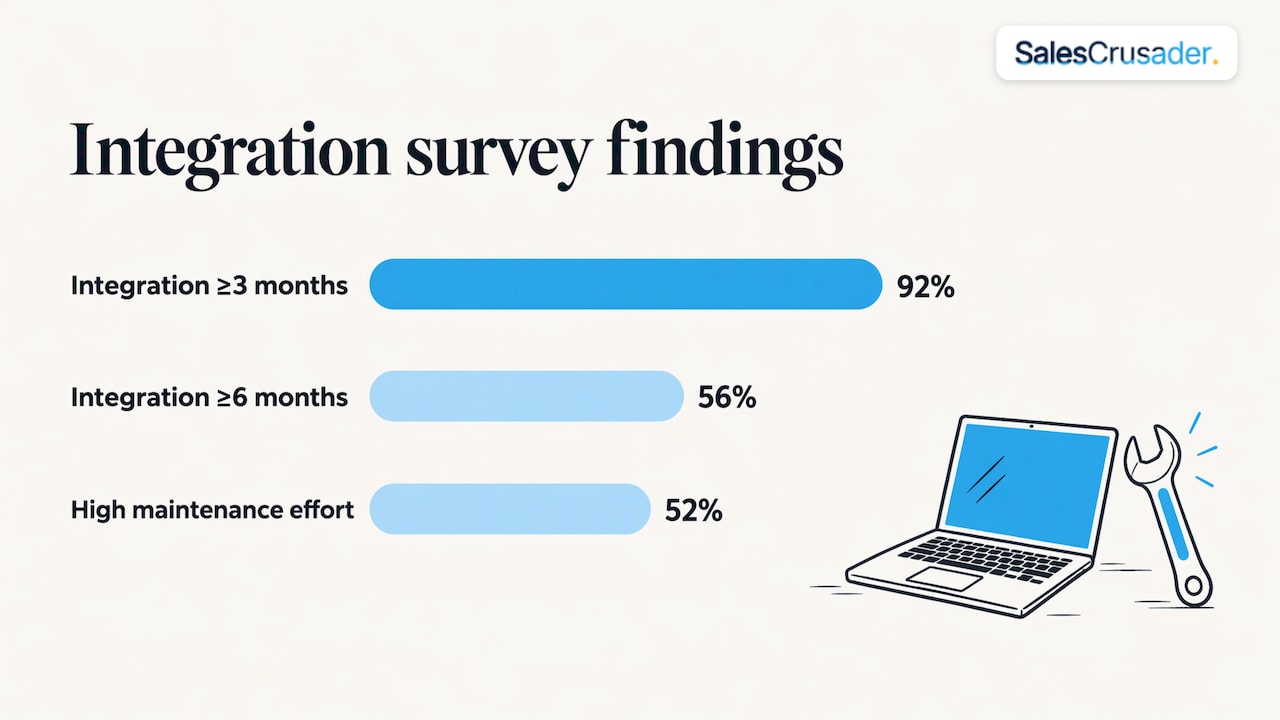
Integration projects are slower and heavier than most leaders expect. An IDC survey from November 2022 found that 92% of respondents said building and deploying a single cloud or SaaS integration takes three months or more, and 56% said six months or longer. The same survey reported that 52% saw significant or very significant effort in maintaining manually built integrations. Among companies with 1,000 or more employees, more than half dedicated eight or more full-time staff to maintaining CRM-to-cloud integrations.
You are probably not a 1,000-person company, but the lesson scales down: every custom connection is a thing someone must keep working when a vendor changes an API or a field. The risks to plan for:
| Risk | What it looks like | How to prevent it |
|---|---|---|
| Unclear ownership | Nobody notices when a sync fails | Name an owner per integration and per field |
| Duplicate records | Two partners email the same prospect | Matching rules and scheduled deduplication |
| Dirty migration | Old errors multiplied in the new system | Clean and standardize before import |
| Tool sprawl | Six connectors, none documented | Limit the first release; document every sync |
| No outcome measure | The project ships but nobody can say what improved | Tie each connection to a metric before building |
Budget for maintenance as well as the build. A reasonable rule: if you cannot say who will watch a connection after launch, do not build it yet.
What this means for firms that grow on referrals
Referral-driven firms usually have a CRM that holds names and little else. Pipeline lives in partners’ heads, and the CRM is updated after the fact. When growth requires going beyond the referral ceiling, the CRM has to start capturing activity from new channels: search, LinkedIn, email, paid. The integration question then stops being technical. It becomes: can we see, in one place, which channel produced which booked meeting?
That is also why a standalone integration project often disappoints. The connectors work, the fields map, and yet the CRM is still only as good as the activity that feeds it. If outreach, search, advertising and enrichment are run by four different vendors, you get four feeds with four formats, and the integration work never ends. Our guides on sales analytics consulting and sales funnel optimization cover how to read the results once the data is flowing.
Our perspective
Most CRM integration conversations begin with the wrong question: which tools should we connect? The better question is which decisions you want the CRM to support. If a managing partner wants to know which accounts to pursue this quarter and where the last three good meetings came from, you work backward from that.
We built Sales Crusader as a single outsourced growth department because the integration problem is mostly a fragmentation problem. When search and AI visibility, outreach, paid advertising and the data layer are run together, they share one set of definitions and one reporting view. Records are enriched once, outreach replies are classified and logged, and attribution does not depend on stitching four vendors’ exports together.
Our approach pairs human strategy with AI agents, which is how we can activate services quickly, often within 24 hours, and why a company does not need to hire additional staff to run the connections. Our platform also integrates with CRM tools, so the outreach side writes back to the system your team already uses.
For a firm where one new client is worth $50K or more, that matters. You do not need more dashboards. You need to know that a prospect was found, contacted, replied and booked, and that the record in your CRM says so.
Rory
Where Sales Crusader fits
If your CRM is in place but the pipeline still depends on referrals, the fastest gain usually comes from feeding it better. Sales Crusader unifies search and AI discovery, multichannel outreach, paid advertising, conversion-focused website design and the data layer, with reporting and benchmarking across all of them. You can see how the pieces connect on our how it works page, or look at the multichannel outreach and engagement service if outreach is where you want to start.

The platform itself includes LinkedIn multi-sender, AI reply classification, engagement de-anonymization and integrations with CRM tools. Browse the full set of B2B growth services to see which combination matches your situation.
A practical scoping checklist
Before you talk to any provider, write down answers to these:
- Which three outcomes should the CRM support in the next two quarters?
- Which systems touch a lead or client record today, and who owns each?
- What is the matching rule for people and for companies?
- For each key field, which system is the authority?
- How many duplicates and incomplete records exist now?
- Who will review sync errors weekly after launch?
- How will you know the integration worked: response time, meetings booked per channel, forecast accuracy?
With those answers, any proposal becomes easy to judge. It either addresses them or it does not.
FAQ
What is the difference between CRM integration and CRM implementation consulting?
Implementation sets up the CRM: objects, pipelines, stages and permissions. Integration connects that CRM to other systems and defines how data moves between them. Most firms need implementation once and integration work continuously as tools and channels are added.
How long does a CRM integration take?
It depends on the number of systems and how clean the data is. In an IDC survey, 92% of respondents said a single cloud integration took three months or more. Keeping the first release to two or three revenue-critical connections shortens the path to something useful.
How do I keep CRM data updated without manual work?
Standardize formats at entry, run scheduled deduplication, assign record owners and use enrichment to refresh titles, companies and emails automatically. Pair this with automated logging of form submissions and outreach replies so reps are not retyping activity.
What should I clean before migrating or integrating?
Remove duplicates, standardize formats, validate key fields such as email and domain, and assign owners, as HubSpot’s implementation guide recommends. Do this before import so errors are not copied into the new system.
Sources
- CRM Implementation Guide | Microsoft Dynamics 365
- CRM Data Integration: A Complete Guide | Airbyte
- How data enrichment works in HubSpot
- CRM implementation: An 8-step practical guide | HubSpot
- The Power of Cloud and SaaS | IDC